 QR Scanner
How It Works
Install
Download the app from the App Store.
Scan
Point your camera at any code.
Activate
Your result opens instantly.
The QR Scanner Advantage
What You Can Scan
A quick look at the app in action
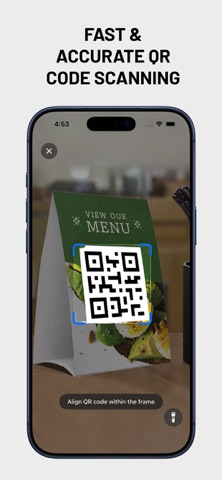
Scan QR codes instantly with your camera
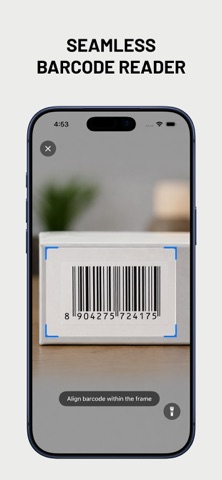
Read barcodes just as fast
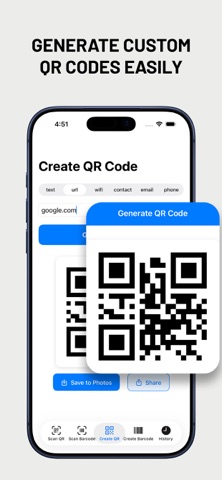
Create and share custom QR codes
Built For Everyday Scanning
📷 Real-Time Camera Scanning
Scan QR codes and barcodes using your camera with real-time detection.
🖼️ Scan From Photos
Extract codes straight from screenshots and saved images in your photo library.
🔦 Flashlight Support
Built-in flashlight makes scanning easy even in low light.
✨ Create Custom QR Codes
Generate QR codes from text, URLs, WiFi, contacts, email, or phone numbers, with your own colors and logo.
▥ Generate Barcodes
Create barcodes in multiple formats including Code 128, PDF417, and Aztec.
🕘 Scan History
Every scan and creation is saved automatically so you can find it again anytime.
Everyday Uses
Built for the codes you run into every day
Restaurant Menus
Scan a QR code on the table to pull up the menu instantly.
Wi-Fi Sharing
Generate a WiFi QR code so guests can join your network with one scan.
Product Barcodes
Read a product barcode while shopping to check details fast.
Business QR Codes
Create a custom branded QR code with your logo for your business.
Links and Text
Automatically detect URLs and text, then open or copy them in one tap.
Contacts
Scan or create a contact card and save it in seconds.
A Day With QR Scanner
A typical day might start with scanning a QR code on a restaurant menu to pull up what's on offer, then joining a friend's Wi-Fi network by scanning the code they generated instead of typing a password. Later, while shopping, you can scan a product barcode to check its details before buying. When you want to find something you scanned earlier, your full history is saved automatically so you can pull it up again with one tap.
Everything Included
Frequently Asked Questions
What can it scan?
QR codes and barcodes, including QR, EAN-8, EAN-13, UPC-E, Code 128, Code 39, ITF-14, PDF417, Aztec, Data Matrix, and more, using your camera or your photo library.
Is it free?
Yes, the app is free to download.
Do I need an account?
No. There is no sign-up and no account required to use the app.
Can it scan codes from photos, not just the camera?
Yes. You can scan from your photo library to extract codes from screenshots and saved images.
Can it create QR codes and barcodes too?
Yes. Generate custom QR codes from text, URLs, WiFi, contacts, email, or phone numbers, plus barcodes in multiple formats.
Which devices does it support?
iPhone and iPad running iOS 17 or later.
Ready to Start Scanning?
Get the app and start scanning QR codes, barcodes, and more.
CONTINUEFree download. No sign-up required.